
Kannel API (emulation)
This is a guide to set up and connect our SMS API to your Kannel client.
If you use Kannel to route messages to different SMS gateways you can easily add an additional SMSC module without changing your application architecture.
Support: berlin@lox24.eu
API Key
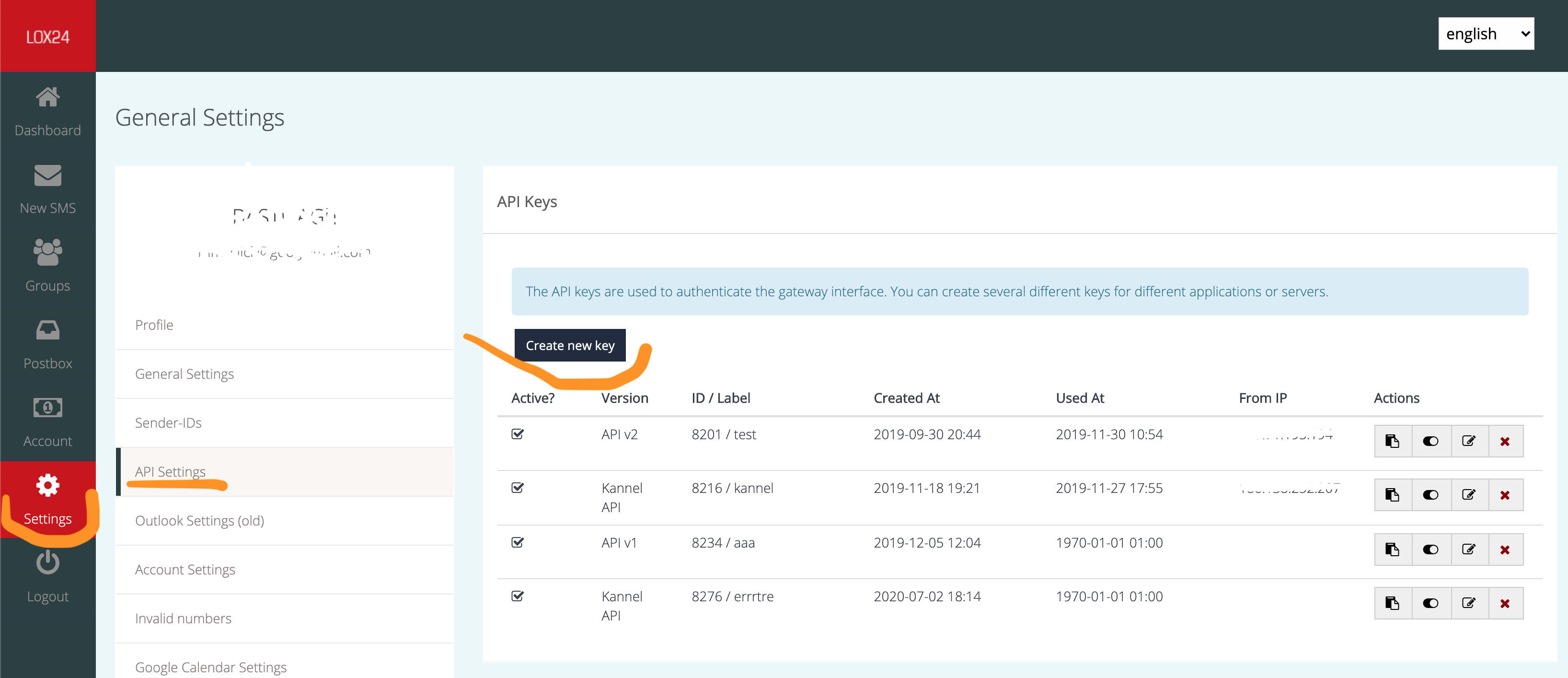
Section titled “API Key”To send messages with Kannel you need to create an authentication key on the account page with the type ‘Kannel API’. Please go to “Settings” -> “API-Settings” and click on “Create new key”. You have to choose as type “Kannel API”.
Config
Section titled “Config”There are two types of SMSC configurations possible to send SMS with LOX24 via Kannel:
- sending DLR requests to your endpoint
- sending DLR requests to your Kannel SMSC module, which in turn sends a DLR request to your endpoint (DLR URL chaining)
Note: What’s about a DLR request you can read here:
Sending DLR requests to your endpoint
Section titled “Sending DLR requests to your endpoint”LOX24 API will send delivery reports directly back to your endpoint without bypassing Kannel.

To use the Kannel API just create a new SMSC config:
group = smscsmsc = httpsystem-type = kannelsmsc-id = "lox24"allowed-smsc-id = "lox24"port = 10443send-url = "https://lox24.eu/api/kannel/{SERVICE_CODE}.php"smsc-username = "{USER_ID}"smsc-password = "{API_KEY}"max-sms-octets = 1530Where:
- SERVICE_CODE - any available for your account service code in lower case, e.g. ‘text2speech’, ‘direct’ and etc.
- USER_ID - your account ID, same as the client ID used to login at account.lox24.eu
- API_KEY - an active API token with type ‘API Kannel’. How to create it see here.
Sending DLR requests to Kannel
Section titled “Sending DLR requests to Kannel”We will send delivery reports back to Kannel which will then send DLRs back to your endpoint.
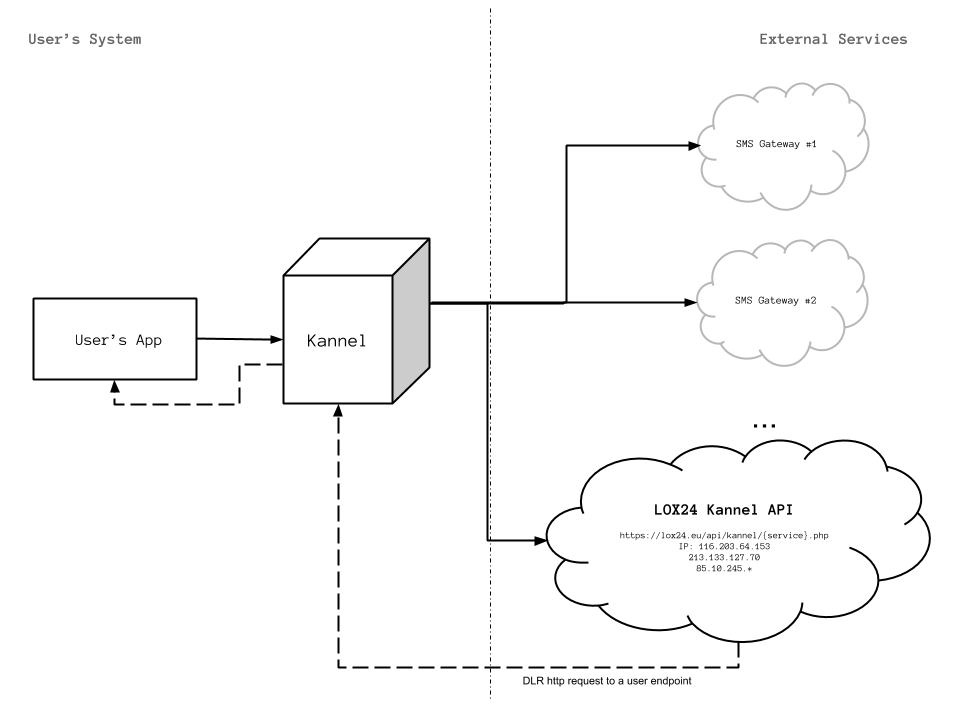
To use the Kannel API just create a new SMSC config:
group = smsc smsc = http system-type = kannel smsc-id = "lox24" allowed-smsc-id = "lox24" port = 10443 send-url = "https://lox24.eu/api/kannel/{SERVICE_CODE}.php" smsc-username = "{USER_ID}" smsc-password = "{API_KEY}" dlr-url = "http://youhosthere.com:10443/?username={USER_ID}&password={API_KEY}" connect-allow-ip = "127.0.0.1;213.133.127.70;116.203.64.153;85.10.245.*" max-sms-octets = 1530Where:
- SERVICE_CODE - any available for your account service code in lower case, e.g. ‘text2speech’, ‘direct’ and etc.
- USER_ID - your account ID, same as the client ID used to login at account.lox24.eu
- API_KEY - an active API token with type ‘API Kannel’. How to create it see here.
Additional notes
Section titled “Additional notes”No DLR, but LOX24 notifications
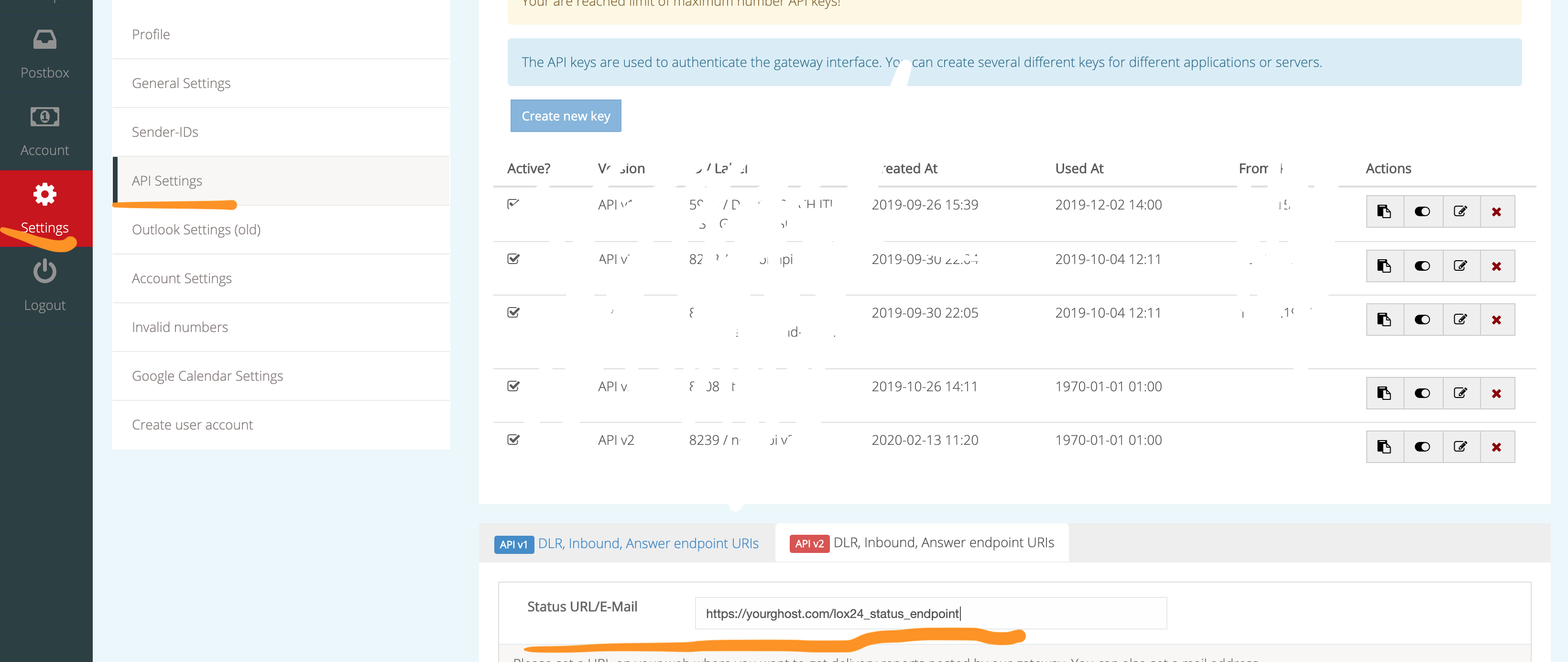
Section titled “No DLR, but LOX24 notifications”If you set-up API v2 Status URL/E-mail in the lox24 web-account you are
able to skip parameter dlr-url and get messages notifications in same
way as if you sent SMS by our normal API v2 directly to a script on your
server or by mail docs
SMSC port
Section titled “SMSC port”In the SMSC config samples are using port 10443, but it can be any port which you like. We are highly recommend blocking it by the firewall and allow TCP connections from LOX24 servers (116.203.64.153,213.133.127.70,85.10.245.*) and well-known hosts.
Supported DLR variables
Section titled “Supported DLR variables”LOX24 Kannel API is a minimal Kannel implementation and does support only the following variables:
-
%d - Kannel report type (integer):
- 1: Delivered to phone
- 2: Non-Delivered to Phone
- 4: Queued on SMSC
- 8: Delivered to SMSC
- 16: Non-Delivered to SMSC
-
%q - The international phone number (E.164), who will receive the message.
-
%T - The time of the delivery report expressed as seconds since UNIX epoch.
Note: You can use any other variables, but we can’t guarantee the correctness of the data.
Parameters
Section titled “Parameters”(required)
Sender-ID of the message. Can be a number (up to 15 digits) or a text (up to 11 character). In case of a number please use preferentially E.164 phone number format. A sender of text may contain spaces but no other special characters. Please note that some countries do not support own sender IDs or do require pre-registration. Our system automatically tries to detect whether a sender ID is a text or a phone number. Avoid special characters in a number and enter it the same way as it would be dialed on a phone.
(required)
Recipient (international) number
(required)
The message text can have a length of up to 1530 characters. With a Unicode SMS, the maximum character length is reduced to 670 characters. Internal encoding is UTF-8.
coding
Section titled “coding”(optional)
You can send a SMS with parameter ‘coding’:
0 - GSM 03.38 (default), 1 - 8-bit or 2 - UCS-2 encoding.
In our case 8-bit and UCS-2 are the same (is_unicode = true) and will be handled as unicode SMS.
dlr-url
Section titled “dlr-url”(optional)
Specify an URL and have us call it with delivery status reports. If parameter ‘dlr-url’ is missed then will be using API v2 DLR endpoint from user’s settings (if them set).
deferred
Section titled “deferred”(optional)
If given, the SMS center will postpone the message to be delivered at now plus this amount of minutes. If skipped then SMS will send ASAP.
Example of request
Section titled “Example of request”That example of get request which user sends to his Kannel smsbox which is listen on port 9001.
Advice
Section titled “Advice”Add to a DLR url custom parameter with internal message ID for proper DLR
request processing. In our example that’s a customid = 1234567.